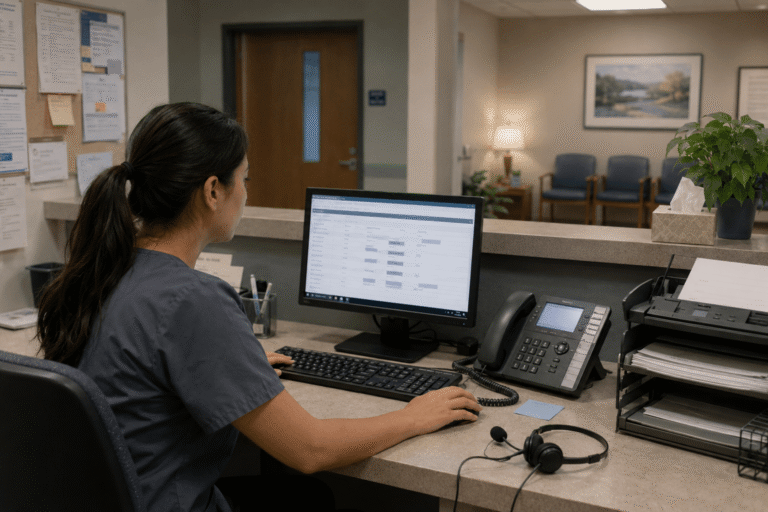

Picture a busy clinic on any given morning in the United States: phones ringing, staff scrambling between patient messages and specialist referrals, and a critical fax about test results somehow lost in the shuffle. These everyday frustrations are more than annoying they slow down care and add unnecessary stress to already overburdened teams. That’s exactly why forward-thinking practices are embracing unified communication tools that boost clinic efficiency, turning disjointed systems into a single, reliable lifeline for everyone involved.
Missed calls, scattered text messages, voicemails buried in separate apps disrupt patient care and expose practices to compliance risks. Erodes patient trust, longer waits and wasted staff time. RingRx changes that by combining voice, secure texting, fax, video visits, and on-call scheduling into one intuitive, fully HIPAA-compliant platform designed specifically for medical workflows. See how your practice can grow, run more smoothly, and deliver a better experience for every patient. Sign Up for RingRx Free Trial today!
The Daily Communication Struggles Facing American Clinics
Healthcare providers across the country know the drill all too well. Receptionists field calls while nurses chase down physicians for approvals. Administrative staff toggle between email, text, and outdated paging systems, often losing precious minutes or worse, critical information in the process. For practices ranging from trauma centers to family health groups and mental health clinics, these gaps aren’t just inconvenient; they impact patient safety and staff morale.
In the United States, where clinics of every size are under pressure to do more with less, the need for smoother coordination has become urgent. Consider a primary care office managing chronic disease patients who require frequent follow-ups: a delayed lab result notification can postpone treatment decisions by hours. Or imagine an urgent care center during peak flu season, where misrouted messages lead to duplicated efforts and frustrated teams. The result? A quiet but powerful shift toward tools designed specifically for medical environments rather than generic office software. These challenges are not isolated incidents but systemic issues that erode efficiency and trust in daily operations.
What Unified Communication Tools Actually Look Like in Practice
At their core, unified communication tools combine voice calls, secure messaging, faxing, and intelligent routing into one seamless platform. In a clinical setting, this means a single inbox where a text from a patient, a call from a pharmacy, and an incoming lab report all land together. No more checking multiple apps or hunting through paper stacks. These systems support real-time handoffs between care team members, automated routing based on specialty or urgency, and built-in compliance safeguards that keep everything HIPAA-secure by design.
Imagine a nurse receiving an urgent alert on her mobile device while simultaneously updating the electronic health record all within the same secure interface. Or a physician reviewing a faxed referral directly in the patient chart without ever touching a scanner. The tools are engineered to mirror the fast-paced, high-stakes reality of healthcare delivery, ensuring that information flows exactly where it needs to go, when it needs to go there.
The Market Momentum Behind Better Clinic Communication
Industry research confirms what many administrators already sense. The global clinical communication market was valued at USD 3.29 billion in 2025, with North America dominating the global market with a share of 42.86% in 2025. This reflects a clear reality: healthcare teams need technology that actually fits their workflows rather than forcing them to adapt to the technology. The solutions include mobile messaging apps, email platforms, real-time communication tools, and integrated EHR systems for streamlined communication. They focus on technologies that enhance information sharing among healthcare professionals, aiming to improve patient safety, care coordination, and workflow efficiency within healthcare settings. Rising prevalence of chronic diseases, aging populations, and increased hospital admissions place a growing burden on professionals, making practical, reliable communication platforms not just helpful but essential for sustainable operations.
This isn’t about flashy gadgets. It’s about practical relief reducing the administrative load so physicians and nurses can focus on what matters most: their patients. Clinics adopting these solutions often discover that the real value lies in how quickly teams can respond and collaborate without friction.
How These Tools Deliver Measurable Efficiency Gains
The benefits show up quickly once a practice makes the switch. Call routing becomes intelligent instead of chaotic, so the right person answers every time. Secure messaging replaces back-and-forth emails and sticky notes. Faxing integrates directly into the digital workflow, eliminating scanning and manual filing.
- Teams experience fewer missed messages and faster response times during shift changes.
- Handoffs between departments become smoother and more reliable.
- Administrative burdens decrease, freeing hours each week for direct patient interaction.
- Overall workflow efficiency improves, supporting everything from routine check-ups to complex care coordination.
For clinics handling high volumes of metabolic care or specialty referrals, these improvements translate into tangible operational advantages. Staff report higher morale because they spend less time chasing information and more time delivering care. The platforms are built around real medical workflows, incorporating on-call scheduling, priority alerts, and direct integration points that make perfect sense in a busy exam room or behind the front desk.
What Sets Healthcare-Specific Platforms Apart
Not every communication tool is created equal, especially when patient data and regulatory compliance are on the line. Leading solutions stand out because they are designed from the ground up for healthcare. They deliver unified HIPAA-compliant communications with healthcare-specific features that generic apps simply cannot match.
Transparent pricing is another key differentiator. Practices no longer face surprise overages or complicated billing structures. What you see is what you get clear costs that make budgeting straightforward and predictable. These platforms handle the full spectrum of communication channels phone, text, fax, and smart routing without forcing staff to learn an entirely new way of working. The result is strong adoption that lasts, rather than another system that gathers digital dust on the shelf.
Overcoming the Most Common Objections to Switching
It’s natural for clinic leaders to hesitate. Switching systems can feel disruptive, especially when daily operations already run at full tilt. Many worry about reliability across every channel will calls drop, texts fail to deliver, or faxes get lost in transition? Others seek clearer proof of HIPAA compliance and real value before walking away from cheaper alternatives.
Today’s healthcare-first platforms directly address these concerns. Implementation is designed to be minimally invasive, often with guided onboarding that keeps the practice running smoothly from day one. Reliability comes built-in through redundant infrastructure and proactive monitoring, so teams can trust the system even during peak hours. On the compliance front, leading solutions provide straightforward documentation and security protocols that go well beyond basic checkboxes. When it comes to value versus cost, the combination of time savings, reduced errors, and improved staff satisfaction quickly demonstrates return on investment often within the first few months of use.
Practical Steps for Clinics Ready to Upgrade
Making the move doesn’t have to be overwhelming. Start by mapping your current pain points: Where do messages get lost? Which channels create the most friction? From there, look for platforms that offer a true unified experience rather than a collection of separate tools patched together.
- Assess how the solution will integrate with your existing electronic health records and daily routines.
- Prioritize ease of use so physicians, nurses, and front-office staff can adopt it without extensive training.
- Evaluate ongoing support options reliable customer service that understands the unique pace of healthcare makes all the difference.
- Request demonstrations focused on your specific workflow to ensure the fit is right from the start.
The strongest options emphasize seamless adoption and measurable improvements tailored to real clinical demands.
The Future of Communication in American Healthcare
As telehealth continues to expand and care teams become more distributed, unified communication tools will only grow in importance. Clinics that embrace them now are positioning themselves for long-term success better patient experiences, stronger team collaboration, and operational efficiency that keeps costs in check while improving outcomes. The focus remains on secure, real-time communication that enhances telehealth efficiency and supports evolving care models across the country.
In the end, it’s not about chasing the latest technology. It’s about choosing tools that finally work the way healthcare actually happens connecting providers, patients, and information without barriers.
Final Thoughts: Efficiency That Actually Feels Human
Healthcare has always been about connection between providers and patients, among care teams, and across the moments that matter most. Unified communication tools that boost clinic efficiency restore that human element by removing the friction that gets in the way. For practices across the United States, from urban trauma centers to rural family health providers, the right platform doesn’t just streamline operations. It creates space for better care, lower stress, and the kind of focus that makes medicine rewarding again.
If your clinic is ready to leave the chaos behind, the path forward is clearer than ever. The tools exist. The benefits are real. And the difference they can make for your team and your patients is something you’ll feel from the very first day.
Frequently Asked Questions
What are unified communication tools in healthcare, and how do they improve clinic efficiency?
Unified communication tools in healthcare combine voice calls, secure messaging, faxing, and intelligent call routing into a single, integrated platform. Instead of toggling between multiple apps or paper-based systems, clinic staff manage all communications from one interface. This reduces missed messages, speeds up handoffs between departments, and cuts administrative burden freeing up more time for direct patient care.
Are healthcare unified communication platforms HIPAA-compliant?
Yes purpose-built healthcare communication platforms are designed from the ground up to meet HIPAA compliance requirements, unlike generic office messaging tools. They include built-in security protocols, encrypted messaging, and audit-ready documentation to protect patient data across every channel. Leading solutions also offer transparent pricing and guided onboarding to make compliance straightforward from day one.
How does switching to a unified clinical communication system affect staff and daily operations?
Modern healthcare communication platforms are built for minimal disruption, with guided implementation that keeps clinics running smoothly during the transition. Staff typically experience faster adoption because the tools mirror real medical workflows including on-call scheduling, priority alerts, and EHR integration. Most practices report measurable ROI within the first few months through time savings, fewer errors, and improved team morale.
Disclaimer: The above helpful resources content contains personal opinions and experiences. The information provided is for general knowledge and does not constitute professional advice.
You may also be interested in: Texting vs. Calling: What Patients Really Want in 2025 – RingRx
Missed calls, scattered text messages, voicemails buried in separate apps disrupt patient care and expose practices to compliance risks. Erodes patient trust, longer waits and wasted staff time. RingRx changes that by combining voice, secure texting, fax, video visits, and on-call scheduling into one intuitive, fully HIPAA-compliant platform designed specifically for medical workflows. See how your practice can grow, run more smoothly, and deliver a better experience for every patient. Sign Up for RingRx Free Trial today!
Powered by flareAI.co