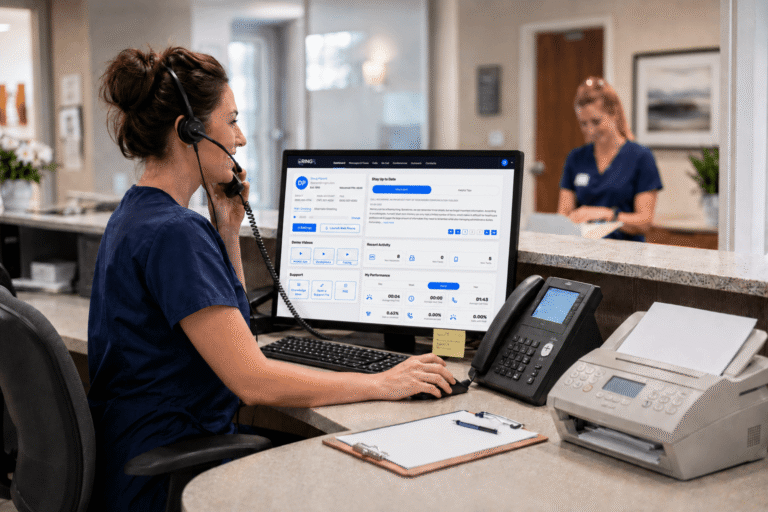
In the daily rush of a medical office, the phone remains the vital lifeline that connects providers with patients seeking appointments, answers, or reassurance. Yet too many calls go unanswered during peak hours, voicemails accumulate without timely follow-up, and after-hours inquiries simply disappear. The consequences are tangible: lost appointments, patients who seek care elsewhere, and practices unable to deliver the reliable service they intend. This quiet operational challenge undermines efficiency and patient trust, but targeted modern solutions are now resolving it effectively.
Across the United States, forward-thinking clinics are discovering that medical office call management systems reduce missed patient calls in ways that feel both practical and transformative. These systems go well beyond answering phones; they intelligently orchestrate every aspect of communication with precision and care, converting potential losses into reliable connections that support better care delivery.
Missed calls, scattered text messages, voicemails buried in separate apps disrupt patient care and expose practices to compliance risks. Erodes patient trust, longer waits and wasted staff time. RingRx changes that by combining voice, secure texting, fax, video visits, and on-call scheduling into one intuitive, fully HIPAA-compliant platform designed specifically for medical workflows. See how your practice can grow, run more smoothly, and deliver a better experience for every patient. Sign Up for RingRx Free Trial today!
The Hidden Cost of Missed Calls in Medical Offices
Every unanswered ring carries a measurable impact. Patients expecting prompt callbacks often schedule with competitors, particularly in markets where same-day access defines choice. Front-desk teams lose valuable time tracking messages instead of assisting those already in the office. The effects appear clearly in online reviews, where complaints about unreturned calls erode reputation more quickly than any marketing effort can restore it.
High-volume settings such as behavioral health clinics, primary care offices, and specialty therapy practices experience this pressure most intensely. After-hours emergencies or routine refill requests cannot wait until morning, yet older phone setups frequently create gaps. Targeted call management shifts the dynamic from constant reaction to dependable, proactive service that protects both revenue and relationships.
What Makes a Modern Medical Office Call Management System Effective?
Contemporary systems operate entirely in the cloud and unify phone, text, fax, and video within a single HIPAA-compliant platform. Calls route automatically according to time of day, provider availability, or clinical urgency. Virtual receptionists deliver professional, warm greetings while collecting essential details before transferring callers. Every interaction occurs under strict security protocols that protect sensitive information.
This integrated design eliminates the inefficiency of multiple separate applications. Staff no longer switch between different logins to check voicemail, send reminders, or verify faxes. Everything resides in one accessible dashboard, reachable from desk phones or mobile devices during rounds or off-site consultations.
Ensuring HIPAA Compliance in Every Communication
Compliance forms the unbreakable foundation rather than an added layer. Leading healthcare VoIP phone systems encrypt every call, text, and fax end-to-end while maintaining detailed audit logs that meet regulatory requirements. Secure patient texting enables providers to send appointment reminders or results safely without exposing information on personal devices. HIPAA compliant voicemail transcription arrives in protected emails with straightforward callback links.
Practices gain freedom from constant worry about whether tools satisfy federal standards. The appropriate system embeds these protections from the outset, delivering confidence to providers and patients alike across every channel.
Essential Features That Truly Reduce Missed Calls
- Intelligent call routing and on-call management: After-hours calls connect instantly to the correct provider with no uncertainty about coverage.
- Virtual receptionist capabilities: Automated yet natural greetings manage routine inquiries, allowing clinical staff to focus on patient care.
- Spam and robocall blocking: Medical offices concentrate on genuine patient needs instead of constant interruptions.
- Voicemail transcription and unified messaging: Messages convert to readable text and reach the proper inbox immediately.
- Patient reminder texting: Automated, HIPAA compliant SMS reduces no-shows and strengthens ongoing engagement.
- After hours call handling for clinics: Dedicated routing ensures coverage outside business hours without manual intervention.
These capabilities function as essential daily tools that quietly eliminate the small oversights accumulating into larger disruptions.
Why Healthcare Practices Are Turning to Cloud Solutions
Legacy phone systems lock offices into physical equipment and inflexible contracts. Cloud-based platforms provide the adaptability that modern medicine demands. Existing numbers transfer seamlessly through straightforward porting, preserving continuity. Mobile integration allows providers to handle calls securely from any location. Transparent pricing eliminates unexpected charges that complicate budgeting for smaller practices.
For private medical practices, therapists, and growing clinics, this transition creates equity. They access sophisticated enterprise features without the accompanying complexity or expense, aligning technology directly with healthcare workflows.
Introducing a Healthcare-First Platform Built for Real Workflows
RingRx stands out as a healthcare-focused cloud communications platform that provides HIPAA-compliant phone, text, fax, and video communication solutions for medical practices, clinics, and healthcare organizations. The platform enables providers to securely connect with patients and staff through VoIP calling, messaging, web-based faxing, and video consultations while maintaining strict healthcare privacy standards.
Designed specifically for the healthcare industry, RingRx offers customizable features such as call routing, virtual receptionists, on-call management, voicemail transcription, and mobile or desk phone integration. These tools help practices streamline front-office workflows and improve patient communication without the headaches of generic systems. Its healthcare-first platform built for real medical workflows, unified HIPAA-compliant communications, and transparent pricing with no hidden fees set it apart from ordinary alternatives.
Overcoming Common Hesitations About Switching
Many practices pause at the thought of disruption during transition. Yet current platforms simplify number porting and support parallel operation so daily operations continue uninterrupted. Reliability concerns across phone, text, fax, and routing disappear when features are engineered specifically for medical environments rather than adapted from general business tools.
Questions regarding HIPAA compliance and comparative value against lower-cost options are understandable. The strongest solutions address them directly with clear documentation, responsive support teams, and straightforward pricing structures. Practices that implement these systems consistently observe fewer missed calls, improved staff efficiency, and more positive patient feedback that demonstrates clear return on investment.
The Broader Picture: Patient Engagement on the Rise
Healthcare organizations nationwide understand the strategic value of advanced communication tools. The global customer communication management software in healthcare market was estimated at USD 444.0 million in 2023. This steady expansion underscores how practices increasingly adopt solutions that create personalized interactions across multiple channels and strengthen patient experience and loyalty.
Secure messaging, timely reminders, and effortless office access transform routine exchanges into meaningful connections that support ongoing care and better outcomes.
Taking the Next Step for Your Practice
No medical office intends to miss patient calls, yet the realities of daily operations make it a persistent risk. The right call management system alters this reality with every intelligently routed call, accurately transcribed message, and protected text exchange. Practices adopting these tools experience smoother workflows, greater patient satisfaction, and clinical teams freed to concentrate on delivering exceptional care.
Reliable, HIPAA-compliant technology exists today to minimize missed calls while aligning perfectly with healthcare requirements and real-world demands. The decision now centers on how many patient connections a practice can afford to overlook before embracing solutions designed specifically for medical success.
Frequently Asked Questions
How do medical office call management systems reduce missed patient calls?
Medical office call management systems use intelligent call routing, virtual receptionists, and after-hours handling to ensure every incoming call reaches the right person at the right time. Features like automated greetings, voicemail transcription, and unified messaging dashboards prevent calls from slipping through the cracks during peak hours or outside business hours. By consolidating phone, text, fax, and video into one platform, these systems eliminate the operational gaps that lead to lost appointments and dissatisfied patients.
Are cloud-based medical phone systems HIPAA compliant?
Yes leading healthcare VoIP and cloud communication platforms are built with HIPAA compliance as a core feature, not an afterthought. They encrypt all calls, texts, and faxes end-to-end, maintain detailed audit logs, and support secure patient texting and voicemail transcription delivered to protected inboxes. This means practices can communicate across multiple channels with full confidence that sensitive patient information remains protected under federal standards.
What key features should a medical office look for in a call management system?
A medical office call management system should include intelligent call routing, on-call management, spam/robocall blocking, HIPAA-compliant voicemail transcription, and automated patient reminder texting to cover the most common communication gaps. Virtual receptionist capabilities and after-hours call handling are especially critical for high-volume settings like behavioral health clinics, primary care offices, and specialty practices. Cloud-based platforms that integrate seamlessly with mobile devices and offer transparent pricing are particularly well-suited for private practices and growing clinics.
Disclaimer: The above helpful resources content contains personal opinions and experiences. The information provided is for general knowledge and does not constitute professional advice.
You may also be interested in: 6 Time-Saving Administrative Features for Healthcare Practices
Missed calls, scattered text messages, voicemails buried in separate apps disrupt patient care and expose practices to compliance risks. Erodes patient trust, longer waits and wasted staff time. RingRx changes that by combining voice, secure texting, fax, video visits, and on-call scheduling into one intuitive, fully HIPAA-compliant platform designed specifically for medical workflows. See how your practice can grow, run more smoothly, and deliver a better experience for every patient. Sign Up for RingRx Free Trial today!
Powered by flareAI.co